

Knowledge Base
How Do I Access and Redeem My Perks?
Accessing and redeeming your perks is easy.
Here are the two ways to access and redeem your benefits:
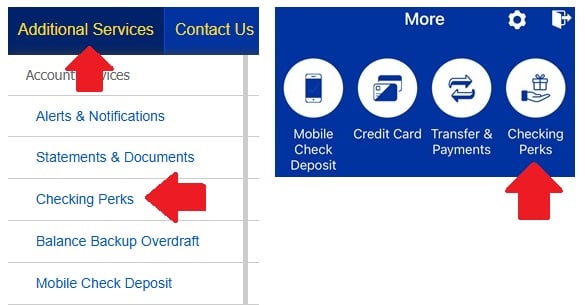
- Log in to Online Banking, select 'Checking Perks' under 'Additional Services'
- Log in to the Truliant app, select 'More' then 'Checking Perks' at the top of the screen
{%GetCTAButton("9a9b5fe5-1981-4103-bcde-4e4831bb9d9c ","pdf-viewer-cta","Essential Plus Perks:")%}
- Cell phone protection
- Roadside assistance
- Buyer protection & extended warranties
- Telehealth for your family
- Save on healthcare (prescriptions, vision and dental discounts)
- Travel & leisure discounts
- Credit & Identity Monitoring
- Shopping perks (receive cash back or use for purchases)
- Shell station fuel perks